Testing and Code Quality
By completing this module you will be able to:
- Write unit tests with unittest and pytest
- Use fixtures and parameterization
- Measure code coverage
- Apply testing best practices
Why Do Testing?
Your code works. You’ve tested it manually a couple of times and everything seems fine. But… are you sure? What if you change something and break something else without noticing? What if a colleague modifies a function you were using and your code stops working?
Think of an airplane pilot. Before taking off, they follow a checklist: check fuel, verify instruments, check flaps… It doesn’t matter if they’ve flown 10,000 hours: they always follow the checklist. Why? Because the consequences of forgetting something are too serious.
Tests are your programmer’s checklist. Every time you run the tests, you automatically verify that everything is still working as it should.
The Benefits of Testing
- Detect errors earlier: It’s much cheaper to fix a bug during development than in production (with angry users)
- Document behavior: Tests show real examples of how to use your code
- Refactor with confidence: You can reorganize your code knowing that if you break something, the tests will tell you
- Sleep peacefully: Knowing your code is tested reduces deployment stress
Without tests, every change to the code is an act of faith. “It seems to work” is not the same as “it works, and I have tests that prove it”.
Types of Tests: The Pyramid
Not all tests are equal. Imagine you have to inspect a car before a long trip:
- Unit tests: Check each piece separately. Do the brakes work? Do the lights turn on? Does the engine have oil?
- Integration tests: Verify that the pieces work together. Does the engine transmit power to the wheels correctly?
- End-to-end tests: Actually drive the car. Can I go from New York to Boston without problems?
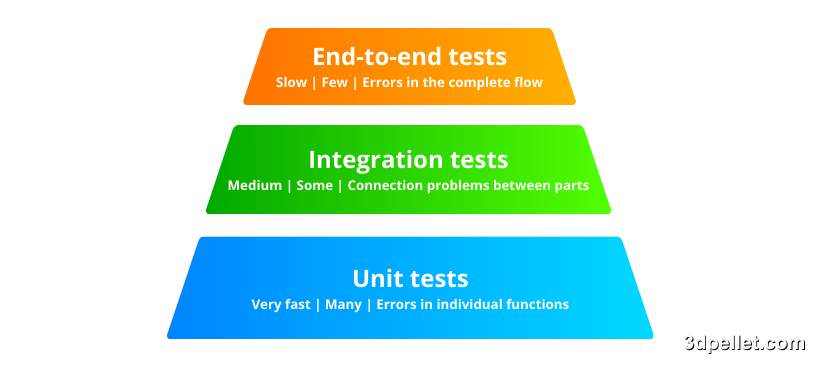
The base of the pyramid is unit tests: you should have many. They’re quick to write, quick to run, and when they fail they tell you exactly what’s broken. End-to-end tests are important but expensive: they take longer to run and when they fail, it’s sometimes hard to find the problem.
| Type | Speed | Quantity | Detects |
|---|---|---|---|
| Unit | Very fast | Many | Errors in individual functions |
| Integration | Medium | Some | Connection problems between parts |
| End-to-end | Slow | Few | Errors in the complete flow |
unittest: The Veteran
unittest comes included with Python, you don’t need to install anything. It’s the original testing tool, inspired by Java’s JUnit. That’s why you’ll see it uses classes and methods that start with assert.
You’ll see it a lot in legacy code (old projects), so it’s important to know it even though today most people prefer pytest.
 1import unittest
 2
 3def add(a, b):
 4    return a + b
 5
 6class TestAdd(unittest.TestCase):
 7    def test_add_positives(self):
 8        self.assertEqual(add(2, 3), 5)
 9
10    def test_add_negatives(self):
11        self.assertEqual(add(-1, -1), -2)
12
13    def test_add_zero(self):
14        self.assertEqual(add(0, 0), 0)
15
16if __name__ == '__main__':
17    unittest.main()
To run it: python test_my_module.py
Assertion Methods
unittest has methods for each type of check:
| Method | In plain English | Example |
|---|---|---|
| assertEqual(a, b) | “Are they equal?” | assertEqual(add(2,2), 4) |
| assertNotEqual(a, b) | “Are they different?” | assertNotEqual(1, 2) |
| assertTrue(x) | “Is it true?” | assertTrue(5 > 3) |
| assertFalse(x) | “Is it false?” | assertFalse(3 > 5) |
| assertIsNone(x) | “Is it None?” | assertIsNone(result) |
| assertIn(a, b) | “Is it inside?” | assertIn(3, [1,2,3]) |
| assertRaises(Error) | “Does it raise an error?” | See example below |
 1import unittest
 2
 3class MyTest(unittest.TestCase):
 4    def test_assertions(self):
 5        # Equality
 6        self.assertEqual(1 + 1, 2)
 7        self.assertNotEqual(1 + 1, 3)
 8
 9        # Booleans
10        self.assertTrue(5 > 3)
11        self.assertFalse(3 > 5)
12
13        # None
14        self.assertIsNone(None)
15        self.assertIsNotNone("something")
16
17        # Containment
18        self.assertIn(3, [1, 2, 3])
19        self.assertNotIn(4, [1, 2, 3])
20
21        # Types
22        self.assertIsInstance("hello", str)
23
24        # Exceptions: verify that something raises an error
25        with self.assertRaises(ZeroDivisionError):
26            1 / 0
pytest: The Community Favorite
If unittest is like filling out paper forms (classes, long methods, bureaucracy), pytest is like using a modern app: simple, intuitive, and powerful.
1pip install pytestThe difference is obvious:
 1# test_calculator.py
 2def add(a, b):
 3    return a + b
 4
 5# That simple! Just functions and assert
 6def test_add_positives():
 7    assert add(2, 3) == 5
 8
 9def test_add_negatives():
10    assert add(-1, -1) == -2
11
12def test_add_with_zero():
13    assert add(5, 0) == 5
To run it: pytest test_calculator.py
Why is pytest better?
- Less code: no need for classes or special methods
- Better error messages: shows you exactly what failed and why
- Thousands of plugins: for everything you can imagine
- Compatible with unittest: you can mix both
Fixtures: Setting the Stage
Imagine you’re going to the theater. Before the play starts, the stage must be set up: sets, props, lighting… The actors can’t perform on an empty stage.
Fixtures do exactly that for your tests: they prepare everything needed before the test runs.
 1import pytest
 2
 3@pytest.fixture
 4def sample_user():
 5    """This fixture provides a test user"""
 6    return {
 7        "name": "Ana",
 8        "age": 25,
 9        "email": "[email protected]"
10    }
11
12# The fixture is automatically passed as a parameter
13def test_user_name(sample_user):
14    assert sample_user["name"] == "Ana"
15
16def test_user_age(sample_user):
17    assert sample_user["age"] >= 18
Fixtures with Setup and Teardown
Sometimes you need to clean up after the test. Following the theater metaphor: you set up the scenery before the play, and you take it down after.
graph LR
    A["Setup<br/>(set up stage)"] --> B["yield<br/>(test starts)"]
B --> C["Teardown<br/>(take down)"] 1import pytest
2import os
3
4@pytest.fixture
5def temp_file():
6 # SETUP: prepare before the test
7 filename = "test_temp.txt"
8 with open(filename, 'w') as f:
9 f.write("test content")
10
11 yield filename # The test runs here
12
13 # TEARDOWN: clean up after the test
14 if os.path.exists(filename):
15 os.remove(filename)
16
17def test_read_file(temp_file):
18 with open(temp_file, 'r') as f:
19 content = f.read()
20 assert "test" in contentThe yield is the moment when “the curtain rises” and the show begins. Everything before it is setup, everything after is teardown.
Parameterization: One Test, Many Cases
Imagine a quality control factory. Instead of testing one product by hand, you pass hundreds through the testing machine. Same test, different data.
 1import pytest
 2
 3def is_even(n):
 4    return n % 2 == 0
 5
 6# A single test that tests MANY cases
 7@pytest.mark.parametrize("number,expected", [
 8    (2, True),
 9    (3, False),
10    (0, True),
11    (-4, True),
12    (-3, False),
13    (100, True),
14])
15def test_is_even(number, expected):
16    assert is_even(number) == expected
This runs the same test 6 times, one for each data combination. If any fails, pytest tells you exactly which one.
Marking Tests
Sometimes you need to categorize your tests or skip some temporarily:
 1import pytest
 2
 3# Skip a test (temporarily)
 4@pytest.mark.skip(reason="Not yet implemented")
 5def test_future_function():
 6    pass
 7
 8# Skip under certain conditions
 9@pytest.mark.skipif(condition=True, reason="Only on Linux")
10def test_linux_only():
11    pass
12
13# Tag slow tests
14@pytest.mark.slow
15def test_slow():
16    import time
17    time.sleep(5)
18    assert True
19
20# Run excluding slow tests:
21# pytest -m "not slow"
Mocking: The Stunt Doubles
When you watch an action movie and the protagonist jumps from a burning building, it’s not the real actor. It’s a stunt double: someone who simulates being the actor for dangerous scenes.
In testing, mocks are those doubles. They simulate being real objects so you can test your code without depending on external services: APIs, databases, file systems…
Why do you need mocks?
- You don’t want to make real HTTP requests on every test (slow and unreliable)
- You don’t want to send real emails when testing your notification system
- You don’t want to modify the production database
1from unittest.mock import Mock, patch
2
3# Create a fake object that simulates being real
4mock = Mock()
5mock.method.return_value = 42  # "When they call .method(), return 42"
6print(mock.method())  # 42
patch: Temporarily Replace
patch is like saying “during this test, replace X with this double”:
 1from unittest.mock import patch
 2
 3def get_api_data():
 4    """This function would normally make a real HTTP request"""
 5    import requests
 6    return requests.get("https://api.example.com").json()
 7
 8def test_get_data():
 9    # "During this test, requests.get is a double"
10    with patch('requests.get') as mock_get:
11        # Configure what the double returns
12        mock_get.return_value.json.return_value = {"data": "value"}
13
14        # Run the function (uses the double, doesn't make real request)
15        result = get_api_data()
16
17    # Verify the result
18 assert result == {"data": "value"}Use mocks when your code depends on:
- External APIs: You don’t want to depend on internet or third-party services
- Databases: Faster and safer than using a real DB
- File system: Avoid creating/deleting real files
- Date/time: To test code that depends on “now”
Code Coverage: How Much Have You Tested?
Imagine a road map of your code. Coverage tells you: “How many streets have your tests traveled?” If your coverage is 80%, it means your tests have executed 80% of the code lines.
1pip install pytest-cov1# Run tests with coverage measurement
2pytest --cov=my_module tests/
3
4# Generate a visual HTML report
5pytest --cov=my_module --cov-report=html tests/The HTML report shows you exactly which lines are covered (green) and which are not (red). Very useful for identifying which parts of your code need more tests.
Coverage tells you that the code was executed, not that it works correctly. You can have 100% coverage and still have bugs. Tests must verify that the behavior is correct, not just that the code runs.
Best Practices
Project Structure
Organize your tests in a separate folder that mirrors the code structure:
project/
├── src/
│   └── my_module/
│       ├── __init__.py
│       └── calculator.py
└── tests/
    ├── __init__.py
    ├── conftest.py         # Shared fixtures between tests
    ├── test_calculator.py  # Tests for calculator.py
    └── test_utilities.py
Name Tests Clearly
The test name should explain what it tests and what it expects. When a test fails, the name will tell you immediately where to look for the problem:
 1# Bad: what does this test?
 2def test_1():
 3    pass
 4
 5# Good: the name explains everything
 6def test_add_two_positive_numbers_returns_sum():
 7    assert add(2, 3) == 5
 8
 9def test_divide_by_zero_raises_exception():
10    with pytest.raises(ZeroDivisionError):
11        divide(10, 0)
AAA Pattern: The Recipe for Every Test
Every well-written test follows the AAA pattern: Arrange, Act, Assert. It’s like following a cooking recipe:
- Arrange (Prepare): Gather the ingredients and utensils
- Act (Do): Cook the dish
- Assert (Verify): Check that the result is as expected
 1def test_add_item_to_cart():
 2    # ARRANGE (prepare): create the necessary objects
 3    cart = Cart()
 4    product = Product("Book", 29.99)
 5
 6    # ACT (act): execute the action we want to test
 7    cart.add(product)
 8
 9    # ASSERT (verify): check that the result is correct
10    assert len(cart.items) == 1
11    assert cart.total == 29.99
Common Testing Mistakes
-
Tests that depend on order
- Tests should be able to run in any order and independently
-
Tests that depend on external data
- If your test calls a real API, it will fail when there’s no internet
- Use mocks to simulate external services
-
Tests that are too large
- A test should test ONE thing. If it fails, you should know exactly what’s wrong
- If your test has many asserts, it should probably be several tests
-
Not testing edge cases
- What happens with 0? With None? With empty lists? With very long strings?
- Bugs usually hide at the extremes
-
Tests that test implementation, not behavior
- Bad: verify that an internal function was called
- Good: verify that the result is as expected
Quick Guide: What to Test?
| Situation | Test it? | Example |
|---|---|---|
| Business logic | Yes, always | Price calculations, validations |
| Edge cases | Yes, always | Values 0, None, empty lists |
| Code that can fail | Yes | Data parsing, conversions |
| Critical integrations | Yes | Database connection |
| Simple getters/setters | Probably not | def get_name(self): return self._name |
| Third-party code | No | The library already has its own tests |
Test the code that you would be afraid to change without tests. If modifying a function makes you nervous because you might break something, that function needs tests.
Practical Exercises
Create tests for a Stack class that has push, pop, peek, and is_empty methods.
Write parameterized tests for a function that validates emails.